📲Pindah ke Device Baru
Ganti HP/tablet (rusak, upgrade, atau hilang)? Pindahkan data + license KasGo F&B ke device baru. 2 cara: Transfer via WiFi (Cepat) langsung device-to-device, atau lewat file backup.
Halaman Pindah ke Device Baru
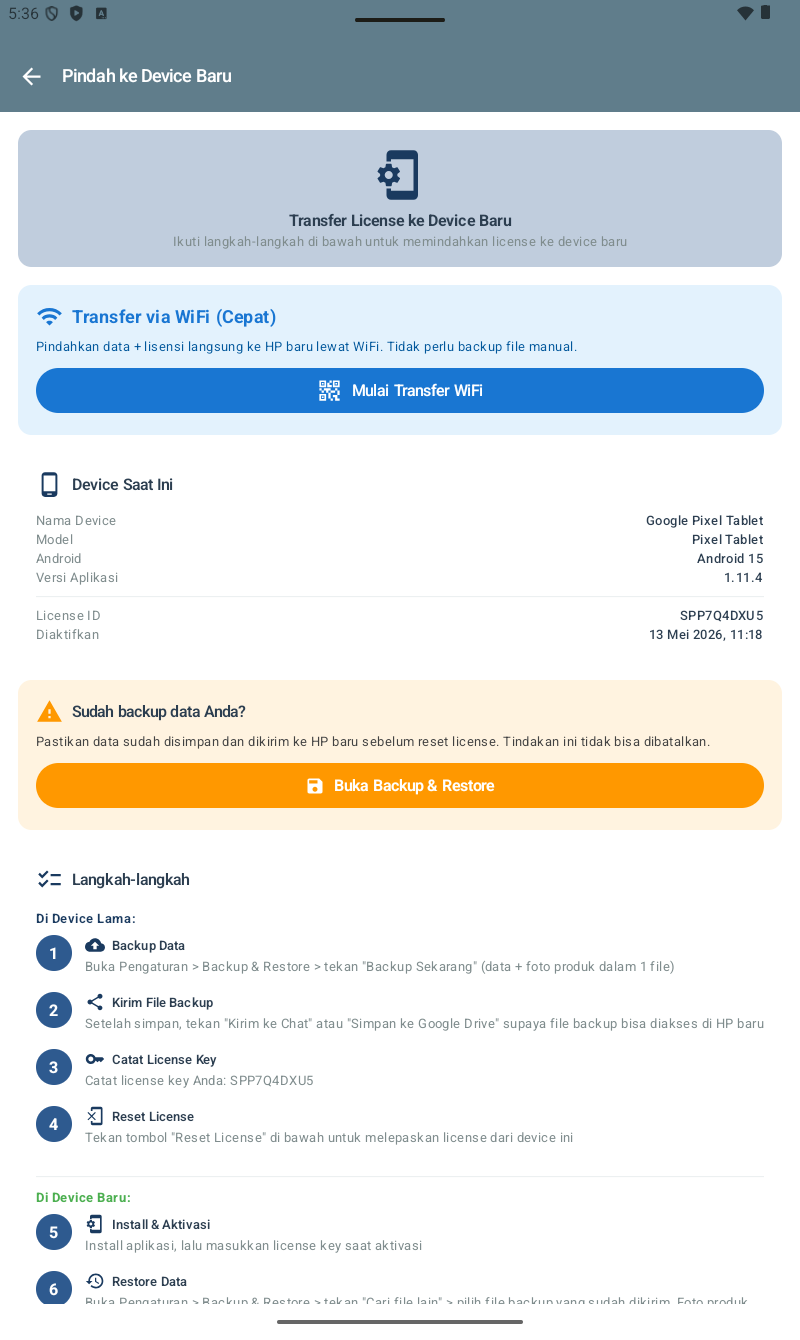
Akses: Beranda → Pengaturan → Pindah ke Device Baru. Halaman menampilkan info device saat ini (License ID, versi, tanggal aktivasi), warning backup, dan langkah-langkah detail.
Metode 1: Transfer via WiFi (Cepat)
Paling cepat — data + license dipindahkan langsung lewat WiFi/Hotspot lokal. Cocok kalau kedua HP masih bisa menyala & di lokasi sama.
Di Device Lama
- Tutup shift dulu kalau ada shift aktif.
- Pengaturan → Pindah ke Device Baru.
- Tap Mulai Transfer WiFi.
- Pilih mode Source / Kirim Data.
- Device menampilkan QR Code atau IP/port.
Di Device Baru
- Install KasGo F&B. Pilih Pindah dari Device Lama (jangan aktivasi dulu).
- Scan QR Code dari device lama, atau input IP/port manual.
- Tunggu transfer selesai (1-5 menit).
- Verify data ter-restore.
License aktif di device baru. Device lama auto-kembali ke layar aktivasi.
Metode 2: Backup & Restore (Manual)
Cocok kalau device lama rusak/hilang — atau di lokasi terpisah dari device baru. Butuh file .zip backup yang sudah disiapkan.
Di Device Lama (4 Langkah)
- Backup Data — Pengaturan → Backup & Restore → tekan "Backup Sekarang" (data + foto dalam 1 file
.zip). - Kirim File Backup ke WhatsApp / Google Drive / Email.
- Catat License Key — di section Device Saat Ini. Penting untuk aktivasi di HP baru.
- Reset License — tap tombol Reset License. License lepas dari device ini.
Di Device Baru (2 Langkah)
- Install & Aktivasi dengan license key yang tadi dicatat.
- Restore Data — Pengaturan → Backup & Restore → tap Cari file lain → pilih file backup.
Tips Migrasi F&B
- Backup dulu sebelum reset license. Tindakan reset tidak bisa dibatalkan.
- Catat License Key di notes / password manager / kertas aman. Hilang license = harus hubungi support.
- Lakukan migrasi di luar jam operasional — pagi sebelum buka resto, atau setelah tutup malam.
- Verifikasi data setelah migrasi: jumlah menu, transaksi kemarin, daftar pelanggan, daftar bahan baku, reservasi aktif.
- Re-pair printer Bluetooth kalau device fisik berbeda — settings tersimpan tapi pairing perlu re-do.